Use Voroa with Claude Code or Cursor: ship, read logs, fix
Let Claude Code or Cursor close the loop on Voroa: the agent pushes, watches the deploy, reads the build log when it fails, then fixes and redeploys on its own.
An AI coding agent writes the code. What it usually cannot do is find out what happened after that code shipped. So it stops at the commit and waits for a person to come back and tell it.
Voroa’s MCP server closes that loop. Connect your agent once, and it can start the deploy, watch it, read the build log if it fails, fix the code and try again.
Nobody has to copy an error message from one window to another.
Connect your agent in two steps
-
In the dashboard, open API Tokens. Give the token a name, such as
Claude Code, tick what it may do, and select Create token. The token is shown once, so copy it straight away.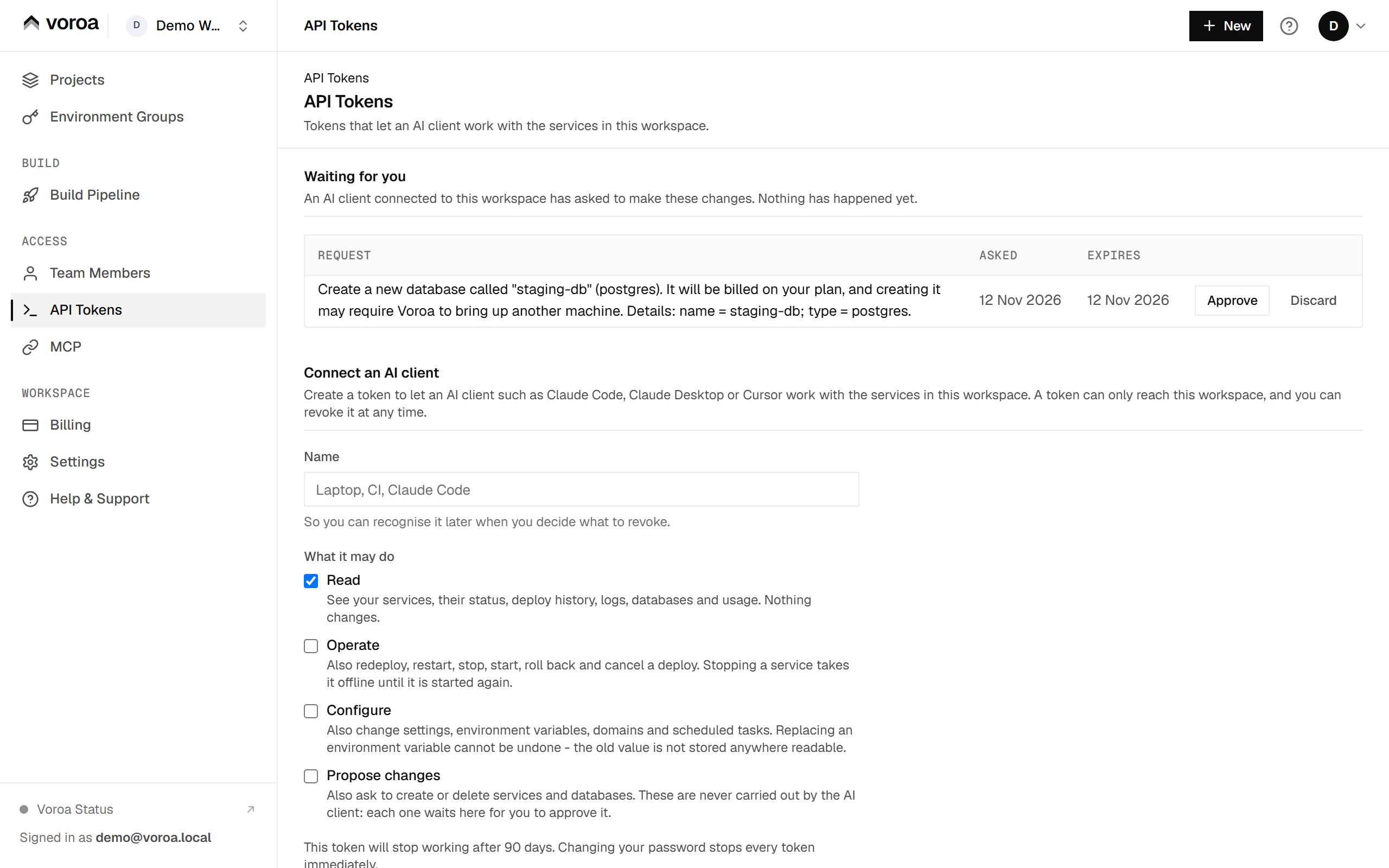
-
Open MCP and copy the one line for your client. In Claude Code it is:
bashclaude mcp add --transport http voroa https://api.getvoroa.com/mcp --header "Authorization: Bearer <your token>"There is nothing to install. Any other MCP client takes the same server URL,
https://api.getvoroa.com/mcp, with the token sent as anAuthorization: Bearerheader.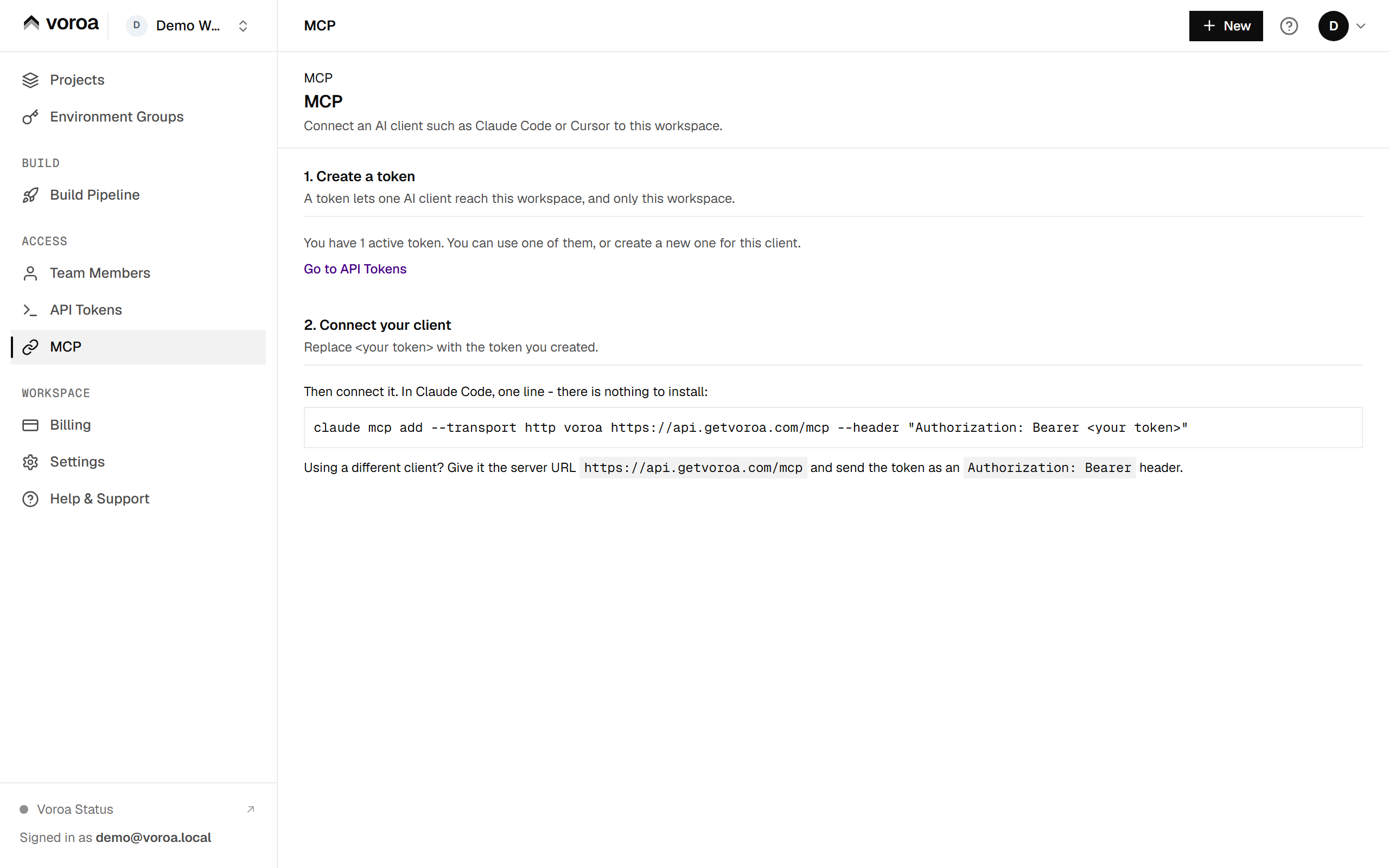


For Claude Desktop, Cursor and other clients, see Connect an AI client.
The loop, once it is connected
You ask for a change. The agent edits the code, commits and pushes. Voroa builds that push automatically. Then, instead of stopping:
- it calls
get_deploy_historyto find the deploy its push started; - it calls
get_service_statusuntil the deploy resolves; - if the deploy failed, it calls
get_build_logand reads the actual error; - it fixes the cause and pushes again;
- if the build passed but the service did not come up, it calls
get_runtime_logs, which is where a missing environment variable or a bad connection string actually shows itself.
Step three is the one that changes everything. A build failure is a few lines of log with a precise cause in them. An agent that can read those lines fixes the cause. An agent that cannot, guesses.
Things worth asking for
“Why did the last deploy of the checkout service fail?” - the agent reads the deploy history, pulls the failing build’s log and tells you the reason instead of the status.
“This service has been up for a week. Anything in the runtime logs I should know about?” - the agent can read runtime logs directly. You do not have to open a tab. It can also search them: asking “find the last TypeError” lets it fetch only the matching lines from the last 24 hours instead of a thousand.
“Roll back the API to the last deploy that worked.” - services:act allows rollback. The agent can
find the right deploy in the history first.
“Add the Razorpay key to the worker’s environment and redeploy.” - services:write covers setting
environment variables, and the redeploy after it is one more call.
“Create a Postgres database for staging.” - this one stops. Creating a database is billable, so on
services:admin the agent proposes it and you approve it in your dashboard.
What it will not do on its own
Anything that creates something, deletes something, costs money or cannot be undone is a proposal: creating a service, database or bucket, deleting anything, restoring a database, turning backups off, changing edge caching, HSTS or autoscaling, creating a deploy hook, and removing a member or an SSH key. An agent can propose any of them; a person approves it in the dashboard, and the proposal expires in an hour. Proposals wait at the top of the API Tokens page under Waiting for you, in plain words, with Approve and Discard:

An agent can never give access to anyone. Inviting a member, raising a member’s role and adding an SSH key are dashboard-only, at every scope.
Three things are off the surface at every scope: database connection credentials, the live build-log stream, and anything that manages tokens.
Environment variables and secret files read back as names only. An agent can tell you that
DATABASE_URL is set, and it can overwrite it. It cannot read what is in it.
This is not a rule about agents. Nothing in Voroa can read a stored secret back.
Choosing a scope
Give the agent the smallest scope that lets it do the job you actually want. The dashboard shows each scope by a plain name:
| In the dashboard | Scope | What it allows |
|---|---|---|
| Read | services:read |
Reading logs and answering “what happened” |
| Operate | services:act |
Redeploying, restarting and rolling back |
| Configure | services:write |
Editing settings, environment variables and domains |
| Propose changes | services:admin |
Proposing new or deleted services and databases for you to approve |
A token stops working after 90 days, or 30 days if it includes Propose changes.
You can raise the scope later by creating a new token; you do not have to start at the top.
Agents and git push are two different paths
An agent can always push to your repository, and Voroa builds that push with or without an MCP token. That is auto-deploy, and it needs nothing from this page.
A token adds the return path: seeing the result, reading the log, and acting on it.
If you only want an agent to write code, you do not need a token. If you want it to finish the job, you do.
Frequently asked questions
Which coding agents work with Voroa?
Any client that speaks MCP. The dashboard gives a one-line command for Claude Code, and the
connection guide covers Claude Desktop and Cursor. Other clients use
the server URL https://api.getvoroa.com/mcp with the token as a bearer header.
Does Voroa see my code through the agent?
No. The agent pushes code to your Git repository as usual, and Voroa builds it from there. The MCP connection only carries questions and actions about your services.
How do I stop an agent’s access?
Revoke its token on the API Tokens page. It stops working at once. Changing your password also stops every token you created.
Can an agent spend money on its own?
No. Anything that costs money, such as a new database or service, is only a proposal until a person approves it in the dashboard.