Free instances on Voroa: what you get without paying
Voroa's free plan: up to 15 services of 512 MB, one free database, 750 running hours a month shared by services and databases, 5 GB bandwidth, 500 build minutes
You can run a real service on Voroa without adding a payment method. Every new workspace starts on the Free plan, and every service you create can use the Nano size at no cost. This page lists exactly what that includes, what it does not, and what happens when you outgrow it.
Create a free service
-
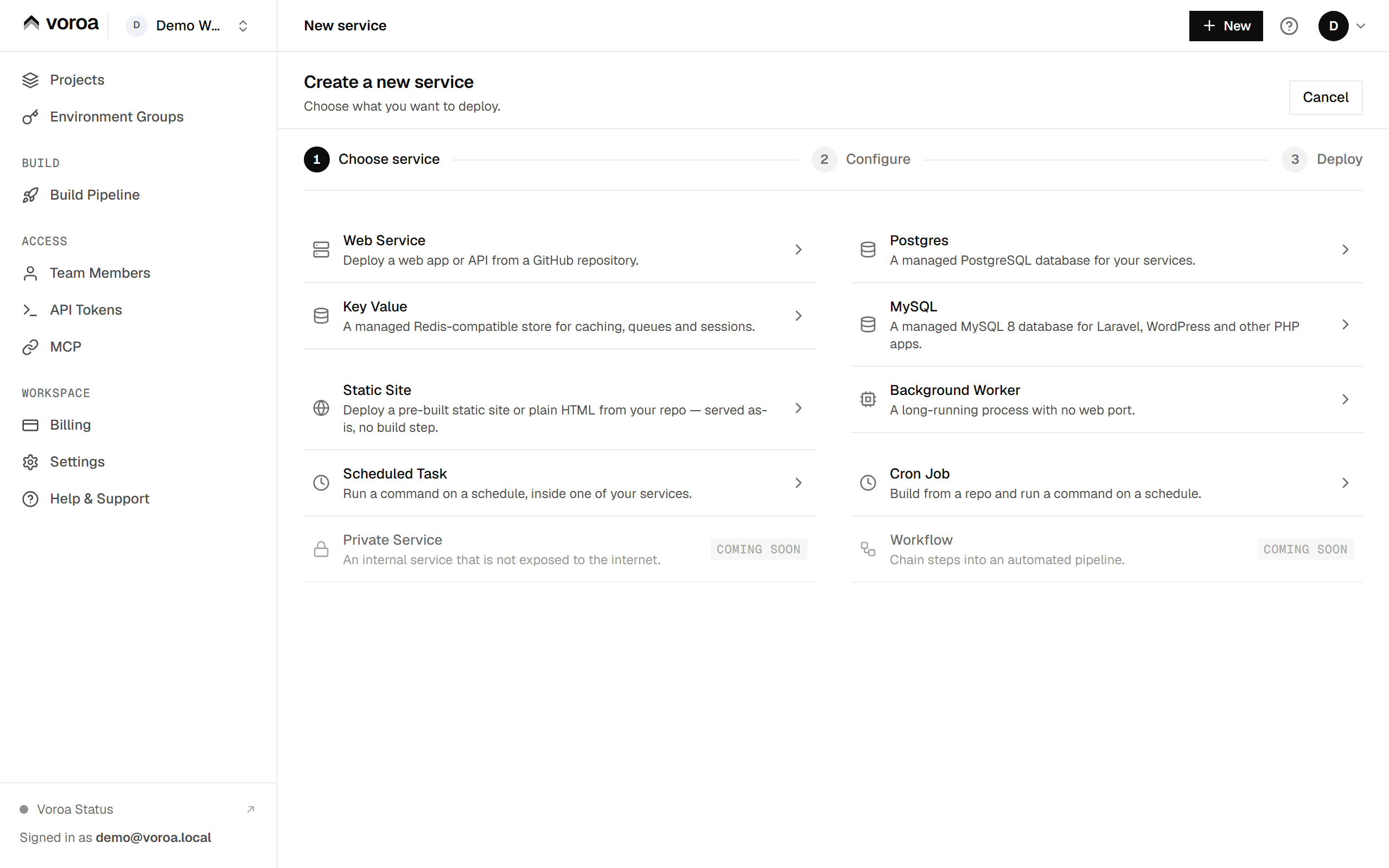
In the dashboard, select New and choose what to create, such as a Web Service.
-
Pick your repository and branch, and give the service a name. See deploy from GitHub for the full form.
-
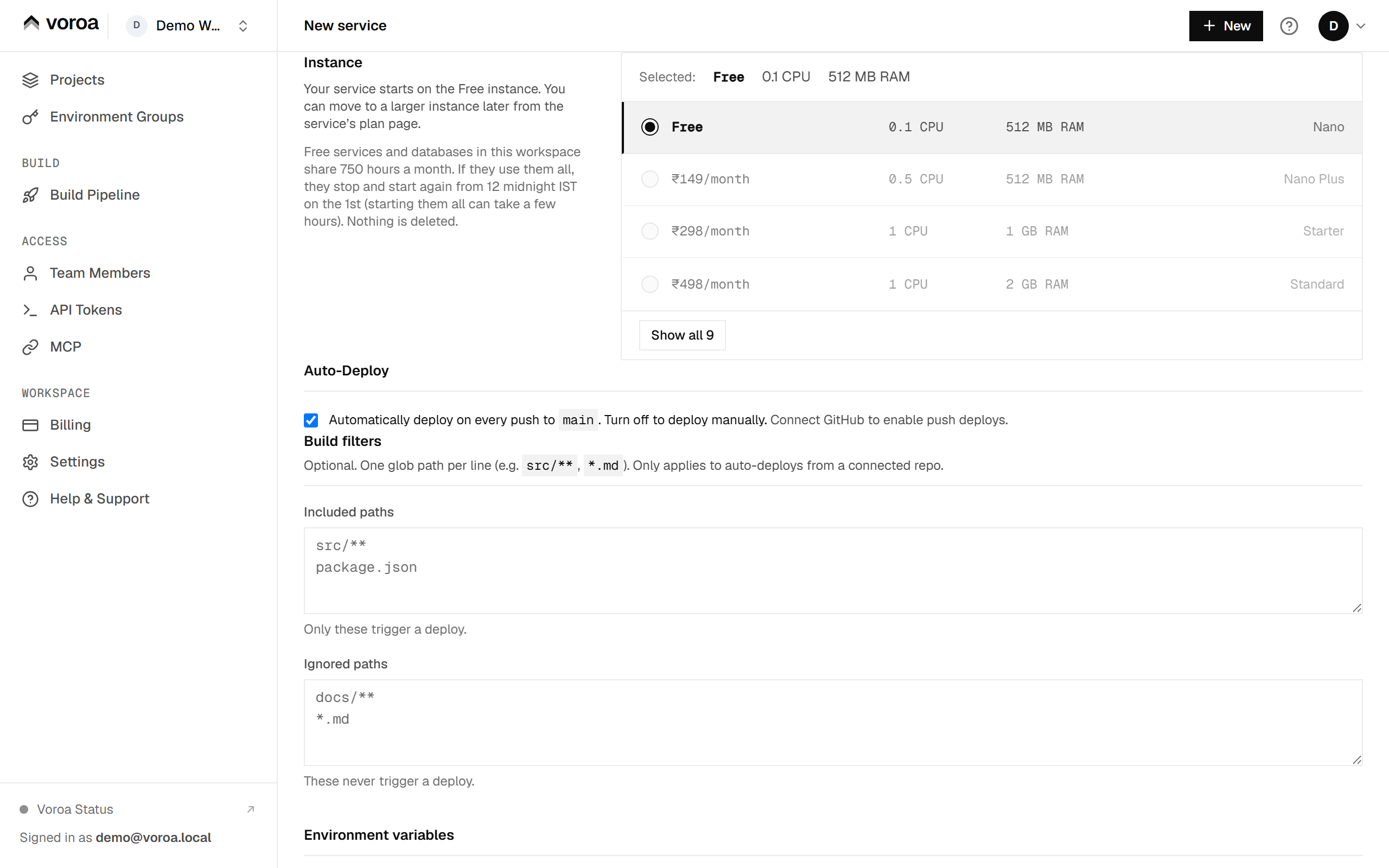
Under Instance, leave Free selected. It is selected by default, so you do not need to add a payment method.
-
Select Deploy. The service builds and goes live on the Free instance.


Upgrading to a paid instance
You can move a free service to a paid size at any time from its Plan page. The new memory and processor apply to the running service once the payment goes through, and a paid size never sleeps. See instance types.
How a free service behaves
A free web service on Voroa goes to sleep after 15 minutes with no requests, and the next request wakes it. While it starts, your visitor sees a short “starting” page instead of an error, and then the page they asked for. A portfolio, a client demo or a side project works well like this; anything that must answer the first request instantly belongs on a paid size, which never sleeps. See idle sleep for exactly what sleeps and what never does.

The free services and free databases in a workspace share 750 free instance hours (running hours) per month on the Free plan, 1,500 on Growth and 3,000 on Scale (India time, the month starts at 12 midnight IST on the 1st). If you move a workspace to a plan with more hours, the higher number applies straight away, and anything stopped for using its hours starts again on its own within about 10 minutes. If you move to a plan with fewer hours, the lower number applies from the 1st of the next month. That means free web services, background workers, cron jobs, and free Postgres and key-value databases. Static sites do not use these hours. One of them running all month uses about 744 hours, so a single free service stays within it. A free web service and its free database running all month use the hours in about 16 days.
- At 80 percent, if the workspace is on track to use all its hours, the owner and admins get an email that names the services and databases.
- At 100 percent, Voroa stops the workspace’s free services and free databases for the rest of the month. Nothing is deleted - your code, settings and domains stay exactly as they are. Deploys and Start are paused for them until the month resets. While a database is stopped, your apps and any outside tool that connects to it cannot reach it.
- From 12 midnight IST on the 1st, they start again on their own, databases first. With many workspaces starting at once, it can take a few hours for all of them to be back. A service or database you stopped yourself stays stopped.
- To run something without this limit, move it to a paid size. Paid services and paid databases never count towards the hours, and neither does a service whose payment is overdue.
- Each service counts on its own. A free database counts even when the app that uses it is paid, and it is stopped with the other free services when the hours run out. If a paid app depends on a database, move that database to a paid size too.
Track your free hours
Open Billing, then Monthly Included Usage. The Free service hours meter shows how many of the month’s hours are used, and lists the free services and databases drawing on them:

Free services are offered as they are, and we may change their limits at any time.
Preview copies of a free service count towards the hours too.
What the free tier includes
Per service, on the Nano size:
| Price | Rs 0 |
| Memory | 512 MB |
| Processor | 0.1 vCPU, shared |
| Uptime behaviour | Web services sleep after 15 minutes without requests and wake on the next one; free services and databases share 750 hours per workspace per month (1,500 on Growth, 3,000 on Scale) |
| Region | Mumbai (IN) |
Per workspace, on the Free plan:
| Services | Up to 15 in total |
| Bandwidth | 5 GB per month |
| Build minutes | 500 per month |
| Custom domains | 2, with automatic HTTPS |
| Projects | 10 |
| Environments | 20 per project |
| Background workers | 15 |
| Scheduled tasks | 15 |
| Team members | 1 (the owner) |
Web services, static sites and background workers all run on the free tier. Custom domains and managed TLS certificates are included — you are not asked to pay to put your own domain on a free service.
What counts as a service
Anything that runs counts as one service, and they all share the same total:
- a web service or a static site,
- a background worker,
- a cron job,
- a managed Postgres or key-value database.
Four is the whole stack most side projects need - a frontend, an API, a database and a cache - and you can mix them however you like. The free web services, workers, cron jobs and databases among them share the workspace’s free hours; a static site does not use them. Preview environments are not counted against this total, and neither are scheduled tasks attached to a service you already run.
A database that you started paying for but never finished paying for does not count, because it is not running. A stopped database does count: stopping it does not release the machine it sits on, which is also why stopping does not pause its bill.
If you are already over the limit, nothing is removed and nothing is switched off - you simply cannot add another service until you remove one, or move to a paid plan.
Free managed databases
Subject to free database capacity being available across the platform, the free tier includes one managed Postgres and one managed key-value store per account:
- Postgres — 1 GB of storage. See Managed databases on Voroa.
- Key value — one instance per account.
That capacity is limited and shared by everyone on the free tier, so a free database is not guaranteed to be available when you ask for one. If the platform is at its free database ceiling, creating a new free database is refused with a clear message rather than being silently queued. Paid database sizes are not affected by this cap.
A free database counts towards the workspace’s free hours while it runs, and is stopped with the rest of the free services when they are used up (see How a free service behaves). This holds even when the app that uses it is on a paid size or the workspace is on a paid plan: only a paid database size leaves the hours.
What the free tier does not include
- A persistent filesystem. Anything your service writes to disk is lost on the next deploy or restart. This is true on every plan, not only the free one — see Persistent disks for where to keep files instead.
- More than one team member. Inviting people to a workspace needs a paid plan.
- Horizontal scaling. A service runs as a single instance.
- A support commitment. The free tier has no support response time attached to it.
What happens if you go over a limit
Bandwidth. When the services in a Free-plan workspace have sent out the 5 GB included for the month, every free service in that workspace is stopped. Nothing is deleted: your code, settings, domains and data are kept, and the owner and admins get an email listing what was stopped. The services start again on their own from 12 midnight IST on the 1st of the next month. To run them sooner, move the workspace to a paid plan; they start again on their own within about 10 minutes. Paid plans are never stopped for bandwidth.
Build minutes. A Free workspace has 500 build minutes a month. When they are used up, new builds and deploys are paused until 12 midnight IST on the 1st; services that are already running keep running. You can see where you stand at any time in the Billing section of your dashboard, described in Usage and billing on Voroa.
Moving to a paid plan
Voroa has two separate choices, and they move independently:
- The size of a service decides its memory and processor. Upgrading one service from Nano to a paid size does not change any other service.
- The plan of a workspace decides the pooled limits above — bandwidth, build minutes, domains and team members.
So you can keep most of a workspace on free services and pay only for the one service that needs more memory. Prices are in rupees, paid by UPI or card, and every invoice carries GST — see GST invoices for cloud hosting.